
Table of contents
- First, Check Whether Proton VPN Is Really the Bottleneck
- How to Run a Fair VPN Speed Test
- Common Reasons Proton VPN Is Slow
- Server Distance Adds Latency
- Server Load Can Reduce Speed
- Protocol Choice Matters More Than Most People Think
- Secure Core and Tor Over VPN Can Slow Things Down
- Wi-Fi Problems Often Look Like VPN Problems
- Your ISP May Be Slowing or Interfering With VPN Traffic
- Older Devices May Struggle With VPN Encryption
- Proton VPN Speed Fix Steps That Usually Work
- 1. Connect to a Nearby Low-Load Server
- 2. Use Quick Connect or Create a Fast Profile
- 3. Turn On VPN Accelerator
- 4. Try WireGuard or Smart Protocol
- 5. Disable Extra Privacy Routing When Speed Matters
- 6. Improve the Local Network
- 7. Test Another Network
- Which Proton VPN Setting Should You Choose?
- When a Speed Drop Is Normal
- What Not to Do
- Bottom Line
- FAQ
- Why is Proton VPN so slow all of a sudden?
- What is the best Proton VPN speed fix?
- Does Secure Core make Proton VPN slower?
- Is WireGuard faster than OpenVPN on Proton VPN?
- Can my ISP make Proton VPN slow?
Proton VPN can feel slow when your traffic is routed through a distant or busy server, your VPN protocol is not ideal for the network, your Wi-Fi is weak, your ISP is shaping encrypted traffic, or your device is struggling to encrypt and decrypt data fast enough. The quickest Proton VPN speed fix is to connect to a nearby low-load server, use Smart Protocol or WireGuard, enable VPN Accelerator if available, and test your connection against your normal non-VPN speed.
First, Check Whether Proton VPN Is Really the Bottleneck
Before changing every setting, run a simple VPN speed test. This keeps you from blaming Proton VPN for a slow home network, overloaded router, or poor mobile signal.
How to Run a Fair VPN Speed Test
- Restart your browser or testing app, then disconnect Proton VPN.
- Run a speed test and note the download speed, upload speed, and ping.
- Connect Proton VPN to a nearby server with low load.
- Run the same speed test again using the same test location if possible.
- Repeat once with another nearby Proton VPN server to compare results.
A VPN almost always reduces speed a little because encryption and routing add overhead. A small drop is normal. A major drop, such as losing most of your download speed, usually points to server choice, protocol, Wi-Fi, ISP handling, or device performance.
Tip: Test with a wired Ethernet connection if you can. If Ethernet is fast but Wi-Fi is slow, Proton VPN is probably not the main issue.
Common Reasons Proton VPN Is Slow
Speed problems usually come from a few predictable causes. The table below shows what each issue looks like and what to change first.
| Cause | What It Looks Like | Best First Fix |
|---|---|---|
| Server distance | High ping, laggy browsing, slow streaming start | Choose a server closer to your real location |
| Server load | Speed drops at busy times or on one specific server | Switch to a lower-load server in the same country |
| Protocol choice | One network is fast, another is slow or unstable | Use Smart Protocol or try WireGuard |
| Wi-Fi quality | Speed changes as you move around the room | Use 5 GHz or 6 GHz Wi-Fi, move closer, or use Ethernet |
| ISP throttling or filtering | VPN works poorly on one ISP but not another | Try Smart Protocol, WireGuard, or Stealth where supported |
| Device performance | Older phone or laptop gets hot, apps feel sluggish | Close background apps and update Proton VPN |
Server Distance Adds Latency
If you connect from Canada to a server in Japan, your data has to travel much farther before reaching the website or app. That extra distance increases ping and can make pages, games, calls, and video streams feel slow even when download speed looks acceptable.
For general browsing and streaming, pick a server in your own country or a nearby country. Only use distant servers when you specifically need an IP address from that region.
Server Load Can Reduce Speed
Even a nearby server can be slow if too many people are using it at the same time. Proton VPN apps show server load indicators, which are useful when choosing between several locations. A lower-load server usually gives better speed and more stable performance.
If you are on the free plan, you may also notice more variation because free server locations are more limited. Switching between available free locations can still help, but paid servers generally provide more choice.
Protocol Choice Matters More Than Most People Think
VPN protocols affect speed, stability, and the ability to connect on restricted networks. Proton VPN commonly supports options such as WireGuard, OpenVPN, IKEv2 on some platforms, Smart Protocol, and Stealth on supported apps.
- Smart Protocol is a good default because the app can choose a working protocol automatically.
- WireGuard is usually the best choice for speed and battery efficiency.
- OpenVPN UDP can be reliable and reasonably fast, especially on networks that allow it.
- OpenVPN TCP may work better on restrictive networks but can be slower.
- Stealth can help on networks that block or throttle VPN traffic, though it may not be the fastest option.
Secure Core and Tor Over VPN Can Slow Things Down
Proton VPN privacy features are useful, but some add extra routing. Secure Core routes traffic through hardened servers before sending it to the destination country. Tor over VPN routes traffic through the Tor network. Both can improve privacy for specific use cases, but they usually reduce speed.
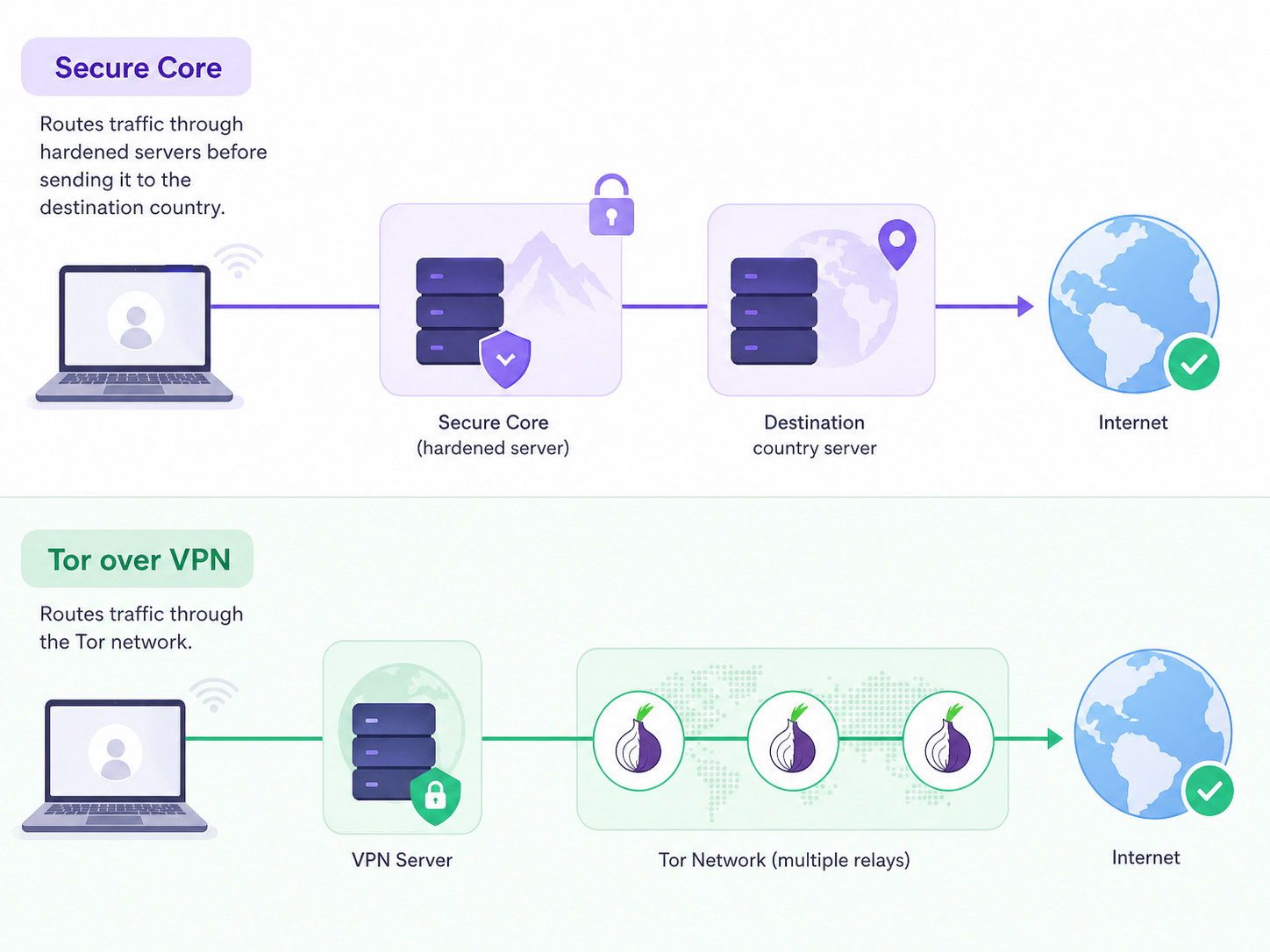
If your main goal is faster browsing, streaming, or downloads, turn off Secure Core and avoid Tor over VPN unless you need those privacy features.
Wi-Fi Problems Often Look Like VPN Problems
A weak Wi-Fi signal, crowded apartment building, old router, or 2.4 GHz congestion can make Proton VPN seem slow even when the VPN server is fine. VPN encryption may make an already unstable connection feel worse because packet loss and retries become more noticeable.
- Move closer to the router.
- Use 5 GHz or 6 GHz Wi-Fi instead of 2.4 GHz when possible.
- Try Ethernet for a clean comparison.
- Restart the router if speeds have dropped across all devices.
- Pause large downloads, cloud backups, and game updates on the same network.
Your ISP May Be Slowing or Interfering With VPN Traffic
Some internet providers, school networks, hotel Wi-Fi systems, and public hotspots treat VPN traffic differently. They may block certain ports, slow encrypted traffic, or perform poorly during peak hours. If Proton VPN is slow only on one network, this is a strong possibility.
In that case, try Smart Protocol first. If that does not help, test WireGuard, OpenVPN TCP, or Stealth where available. Stealth is designed to make VPN traffic harder to identify, which can help on restrictive networks, though it may trade some speed for connectivity.
Older Devices May Struggle With VPN Encryption
VPN apps encrypt and decrypt traffic in real time. Modern phones and laptops handle this easily, but older devices, low-power routers, and machines running many background tasks may bottleneck the connection.
- Update the Proton VPN app and your operating system.
- Close heavy apps, especially cloud sync tools, game launchers, and video calls.
- Check CPU usage while connected to the VPN.
- Test the same Proton VPN server on another device to compare performance.
Proton VPN Speed Fix Steps That Usually Work
Start with the simple changes first. They solve most Proton VPN slow issues without reducing your privacy more than necessary.
1. Connect to a Nearby Low-Load Server
Open the Proton VPN app and choose a server close to your location. If the app shows server load, avoid heavily loaded servers. If one server is slow, switch to another server in the same country before changing advanced settings.
2. Use Quick Connect or Create a Fast Profile
Quick Connect is useful because it can pick a suitable server automatically. If you often use the same country, create a profile for a nearby fast server so you do not have to test manually every time.
3. Turn On VPN Accelerator
Proton VPN offers VPN Accelerator on supported apps and servers. It is designed to improve performance, especially over long-distance connections or unstable networks. If the setting is available in your app, keep it enabled unless you are troubleshooting a specific compatibility issue.
4. Try WireGuard or Smart Protocol
If your app is set to a slower or less suitable protocol, changing it can make a noticeable difference. For most users, Smart Protocol is the safest default. If you want to test manually, try WireGuard first because it is commonly the fastest option.
5. Disable Extra Privacy Routing When Speed Matters
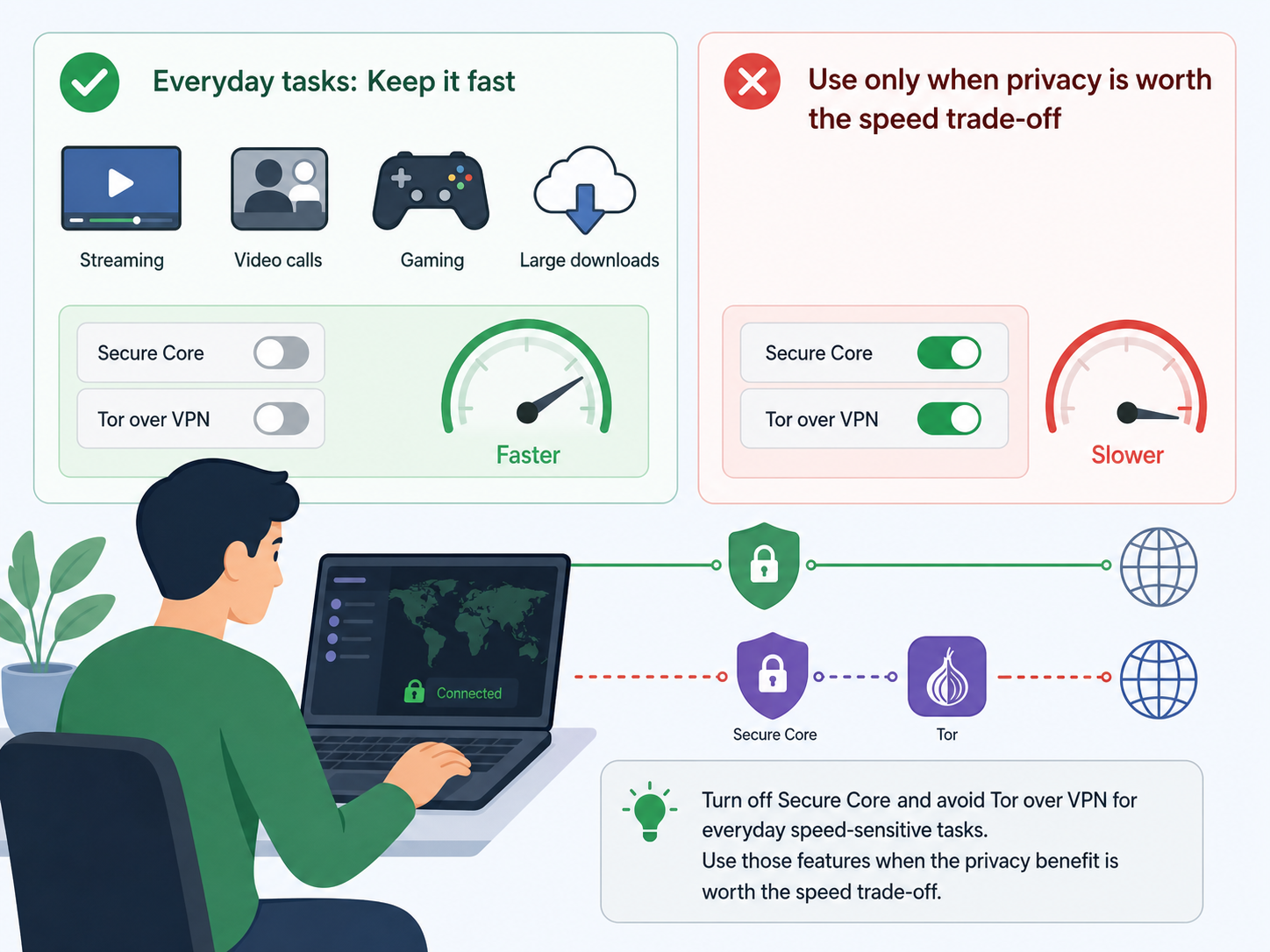
Turn off Secure Core and avoid Tor over VPN for everyday speed-sensitive tasks such as streaming, video calls, gaming, or large downloads. Use those features when the privacy benefit is worth the speed trade-off.
6. Improve the Local Network
If your non-VPN speed is also poor, fix the network before tuning Proton VPN. Use Ethernet, switch to a stronger Wi-Fi band, restart the router, and reduce other traffic on the network. A VPN cannot make a weak internet connection faster than the base connection.
7. Test Another Network
If Proton VPN is slow on hotel Wi-Fi, school Wi-Fi, or one mobile carrier, test it on another connection. A big difference between networks suggests ISP throttling, filtering, congestion, or router limitations rather than a Proton VPN account problem.
Which Proton VPN Setting Should You Choose?
The best setting depends on what you are doing. Use this quick comparison when deciding between speed and privacy.
| Use Case | Recommended Setup | Why |
|---|---|---|
| Fast everyday browsing | Nearby server, Smart Protocol or WireGuard, VPN Accelerator on | Good balance of speed and privacy |
| Streaming | Nearby server in the needed country, WireGuard, low server load | Lower buffering and faster startup |
| Video calls | Closest low-load server, WireGuard, stable Wi-Fi or Ethernet | Lower latency and fewer drops |
| Public Wi-Fi privacy | Smart Protocol, VPN Accelerator on, kill switch if needed | Protects traffic while keeping setup simple |
| Restrictive network | Smart Protocol or Stealth where supported | Improves the chance of connecting successfully |
| Maximum privacy routing | Secure Core or Tor over VPN when needed | More privacy, but slower performance |
When a Speed Drop Is Normal
A moderate speed drop is expected with any VPN. Your traffic is encrypted, sent to a VPN server, then forwarded to the destination. The farther the server and the heavier the route, the more overhead you add.
What is not normal is a connection that becomes unusable while your regular internet is fast. If that happens, test different servers, switch protocols, check Wi-Fi, and compare another network. A careful test usually reveals where the slowdown starts.
What Not to Do
- Do not judge performance from one server test only. Test at least two nearby servers.
- Do not use a distant country unless you need that location.
- Do not keep Secure Core or Tor over VPN enabled for speed-sensitive tasks unless you need them.
- Do not ignore your baseline internet speed. Proton VPN cannot fix a slow ISP connection.
- Do not install random speed booster apps. They rarely help and may create privacy or security risks.
Bottom Line
If Proton VPN is slow, the most effective fix is usually simple: choose a closer low-load server, use WireGuard or Smart Protocol, keep VPN Accelerator enabled, and make sure your Wi-Fi and device are not the real bottleneck. For privacy-heavy features such as Secure Core and Tor over VPN, expect slower speeds and use them when their extra protection is worth the trade-off.
FAQ
Why is Proton VPN so slow all of a sudden?
Sudden slowdowns are often caused by a crowded server, peak-hour ISP congestion, weak Wi-Fi, or a protocol that is not working well on the current network. Switch to a nearby low-load server and try Smart Protocol or WireGuard.
What is the best Proton VPN speed fix?
The best first fix is to connect to the closest low-load server and use WireGuard or Smart Protocol with VPN Accelerator enabled. If speed is still poor, compare your non-VPN speed and test another network.
Does Secure Core make Proton VPN slower?
Yes, Secure Core can be slower because it routes traffic through an additional Proton VPN server before reaching the exit location. It is useful for stronger privacy, but it is not the fastest choice for streaming, gaming, or large downloads.
Is WireGuard faster than OpenVPN on Proton VPN?
In many cases, WireGuard is faster and more efficient than OpenVPN. OpenVPN can still be useful on some restrictive networks, especially when UDP is blocked or TCP is more reliable.
Can my ISP make Proton VPN slow?
Yes. Some ISPs and public networks may throttle, block, or poorly route VPN traffic. Try Smart Protocol, WireGuard, OpenVPN TCP, or Stealth where supported, and compare results on another internet connection.